How to read a script on camera without looking like you’re reading
Put the words you are reading just below the lens: at arm’s length, within about 2 centimetres. Viewers still see eye contact at that angle, and in one study they saw more of it than when the speaker looked straight into the lens. Then read short lines at about 140 words a minute, and let the script follow your voice instead of chasing it.
Why looking slightly below the lens works
People are much less sensitive to someone looking a little below their eyes than to someone looking above or to the side. Video-call researchers have known this since at least 2002, when a Stanford study used it to argue that a camera placed just above the picture of the other person’s face can still deliver eye contact.
A 2024 study in the Journal of Vision tested it directly. Viewers judged photos of people looking at different points around a camera. Perceived eye contact peaked when the person looked about 2 degrees below the lens, and stayed high from 0 to about 3 degrees below. The authors’ summary: look just below the lens, not into it. Earlier studies they cite found the sense of eye contact was lost at about 4.5 degrees above or 5.5 degrees below the camera.
What that means on a phone
An angle becomes a distance once you know how far away the camera is. The study photographed people at 20 to 24 inches (51 to 61 cm), about the distance of an iPhone on a stand at arm’s length.
| Phone to eyes | 2° below the lens (best) | 3° below | 5.5° below (where earlier studies lost eye contact) |
|---|---|---|---|
| 30 cm | 1.0 cm | 1.6 cm | 2.9 cm |
| 40 cm | 1.4 cm | 2.1 cm | 3.9 cm |
| 50 cm | 1.7 cm | 2.6 cm | 4.8 cm |
| 60 cm | 2.1 cm | 3.1 cm | 5.8 cm |
Distance below the lens = distance to the phone × tan(angle).
So at a normal recording distance, the line you are reading should sit within about 2 to 3 cm of the camera. The bottom of an iPhone screen is around 10 cm or more below the front camera, which at 50 cm is about 11 degrees: that is the “reading from the phone” look. The fix is not a better script. It is moving the words up.
Seven habits that make a script sound unscripted
- Keep the reading line near the top. Read from one fixed line just under the camera and let the text move to it, rather than moving your eyes down the screen.
- Use big text and a narrow block. Fewer words per line means less side-to-side eye movement, which the camera picks up easily.
- Read at about 140 words a minute. That is slightly slower than the average English speaker’s 150 and is what Baruch College’s clear-speech guide suggests. Scripts read too fast sound read.
- Write the way you talk. Short sentences, contractions, numbers as you would say them (“forty-four percent”). If a line trips you twice, rewrite it.
- Mark your breaths. A paragraph break is a pause. One idea per paragraph gives you natural places to breathe and to restart a take.
- Let the script follow you. With a fixed scroll speed you either chase the text or wait for it, and both show on your face. Voice-following scrolling moves when you speak and waits when you pause.
- Read it aloud once before recording. Not to memorise it: to find the words you stumble on and the jokes that don’t land.
If you record with the back camera
The back camera is better, but you can’t see the screen. Your options are a second screen facing you (a mirror-glass teleprompter rig, or a second device showing the script), or a phone with a screen on the back. Boardroom Cue is designed for iPhone Duo, where the script can face you on the outer screen while the main camera records. The same 2-to-3-centimetre rule applies to wherever the words sit.
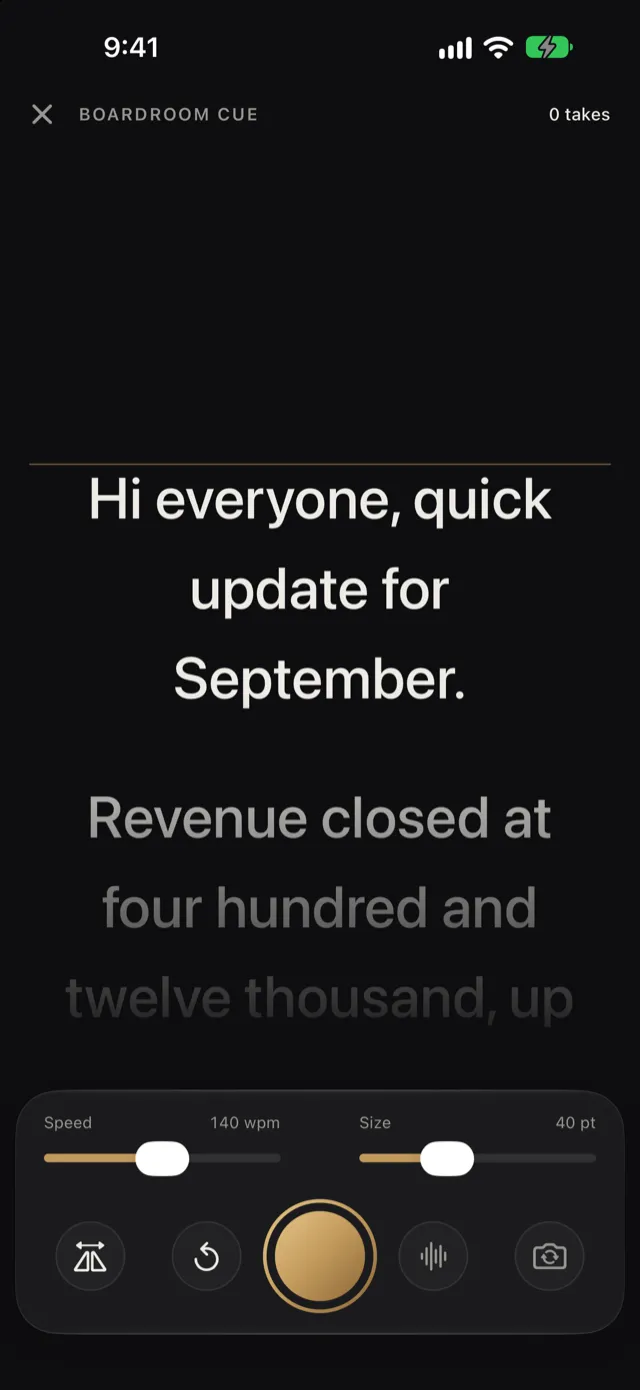
Boardroom Cue puts the script right under the front camera with a reading line you can place where your eyes rest, scrolls at 140 words a minute by default (adjustable from 60 to 220), and can follow your voice instead: it moves as you speak, waits when you pause, and restarts from the paragraph you were reading when you say “again”.
Keep reading
- How to record an investor update video
What to say, in what order, how long it should run, and how to record and send it from your iPhone.
- Investor update video script templates
Six scripts to copy, from a normal month to a hard one, each timed at a natural speaking pace.
- iPhone teleprompter apps compared
Nine teleprompter apps side by side: price, voice scrolling, remotes, captions and privacy.
Sources
- Gao et al., “Don’t Look at the Camera: Achieving Perceived Eye Contact”, Journal of Vision, 2024 (arXiv:2404.17104)
- Chen, “Leveraging the Asymmetric Sensitivity of Eye Contact for Videoconferencing”, CHI 2002
- Baruch College, Tools for Clear Speech: speaking rate
- Apple: iPhone 15 technical specifications (height 147.6 mm)
Drafted with AI assistance from Boardroom Cue’s own settings and the sources above. Found a mistake? Email support@boardroomcue.com.