How to record an investor update video
An investor update video is a one-to-three-minute recording that opens with your headline numbers, names one or two specific asks, and points to the written update for the detail. Write it as a script of 140 to 420 words, read it beside the lens, cut the filler, and send it with captions.
The video doesn’t replace your written update. It sits on top of it: investors hear the month in your voice, see how you talk about the hard parts, and still have the numbers to read. This guide covers what to say, how long to make it, and how to record and send it from an iPhone.
What to say, in this order
Y Combinator partner Aaron Harris recommends putting metrics and growth first and the asks as close to the top as possible, with a short recap at the end (as summarised by Visible, an investor-update tool). A video follows the same logic, because many people stop watching before the end.
- One line of context. “Quick update for September.” No warm-up.
- The headline number and how it moved. Revenue, users, or whichever metric you report every month. Use the same metrics each time, so a bad month is visible too.
- What shipped, and what it changed. One or two things, each with its effect: “Activation is up from 31 to 44 percent.”
- What went wrong. If something did, say it plainly, with what you’re doing about it. It is easier to hear in your voice than to find on page three.
- The asks. One or two, specific enough to act on today: a named kind of introduction, a decision by a date.
- Where the rest is. “Full numbers are in the deck below.” Then stop.
Ready-made versions of this structure, for good months, hard months and fundraising, are in investor update video script templates.
How long should it be?
Aim for one to three minutes. That is the range Boardroom Cue suggests for investor updates, and it is long enough for numbers, one story and the asks. Script length is easier to control than video length, so work in words. The average English speaker talks at about 150 words a minute; Baruch College’s Tools for Clear Speech suggests aiming for about 140 when you want to be understood clearly.
| Video length | At 120 words/min | At 140 words/min | At 160 words/min |
|---|---|---|---|
| 60 seconds | 120 words | 140 words | 160 words |
| 90 seconds | 180 words | 210 words | 240 words |
| 2 minutes | 240 words | 280 words | 320 words |
| 3 minutes | 360 words | 420 words | 480 words |
If the script is over 420 words, cut a section rather than speaking faster. The written update can carry the rest.
An example script
This is the sample script that opens in Boardroom Cue. It is 86 words, about 37 s at 140 words a minute.
How to record it on an iPhone
- Write the script first. Start from your written update: copy the headline numbers and the asks, then say it out loud once and cut anything you stumble on.
- Set up in two minutes. Face a window or a lamp, so the light is on your face rather than behind you. Put the phone at eye level, about an arm’s length away, in a quiet room.
- Read beside the lens. Keep the line you are reading as close to the camera as you can; a few centimetres below the lens still reads as eye contact. How to read a script on camera explains why, with the numbers.
- Don’t restart from the top. If you trip, pause and go again from the start of the paragraph. You will cut the stumble later.
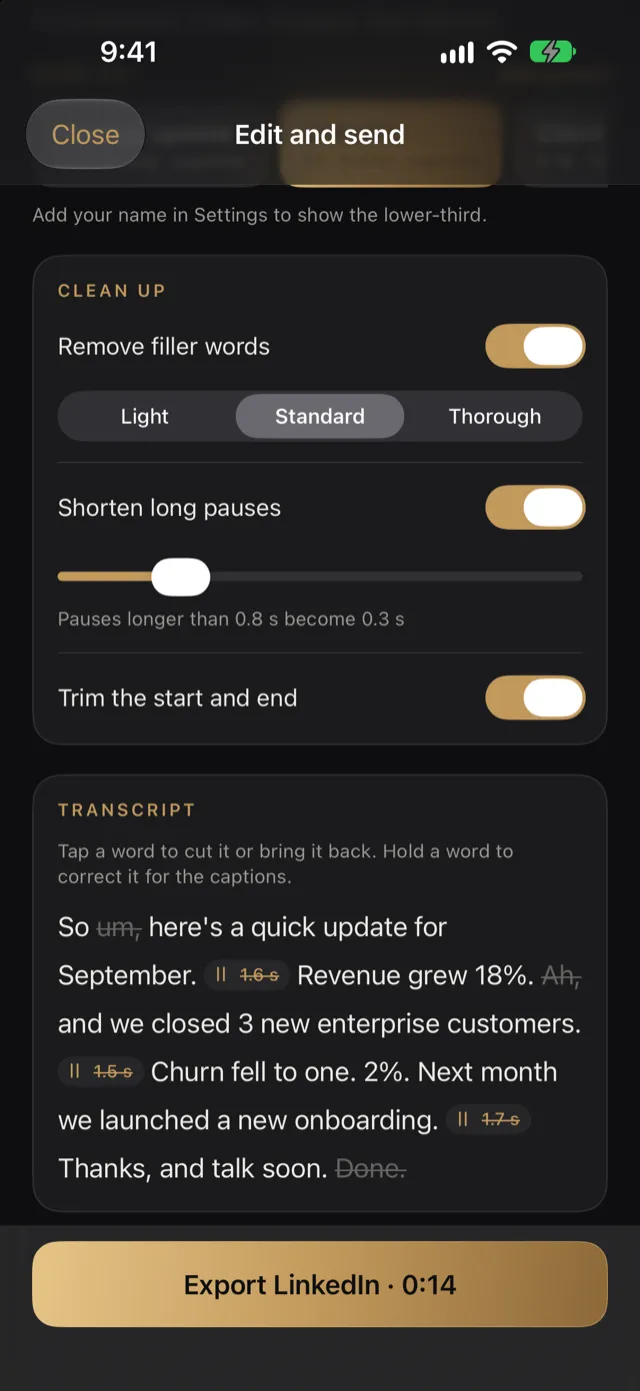
- Clean it up. Remove filler words, shorten long pauses, and trim the dead air at the start and end.
- Send it in a shape that plays everywhere. 1080p H.264 opens on any laptop or phone. Add captions, because some investors will watch with the sound off, and your name, so a forwarded video still says who it’s from.
Mistakes that make updates hard to watch
- Reading from the bottom of the screen. Your eyes drop well below the lens and the viewer sees you looking down.
- Burying the asks. If they come after three minutes, many investors won’t reach them.
- Changing metrics month to month. It reads as hiding the ones that went down.
- No captions. A video in an email is often opened somewhere it can’t play out loud.
- Polishing for an hour. Investors want the month, not a film. One clean take beats five perfect ones that never get sent.
Boardroom Cue does each step above on your iPhone: an investor update template with a 1–3 minute target, the script beside the lens following your voice, filler words and pauses removed, and an “Investor update” export in 1080p H.264 with captions, your name and an end card. Nothing you record leaves the phone until you send it.
Keep reading
- How to read a script on camera without looking like you’re reading
Where to put the words so your eyes still meet the viewer’s, with the research and the numbers.
- Investor update video script templates
Six scripts to copy, from a normal month to a hard one, each timed at a natural speaking pace.
- iPhone teleprompter apps compared
Nine teleprompter apps side by side: price, voice scrolling, remotes, captions and privacy.
Sources
- Visible: Tips from YC on asks, metrics and a recap in investor updates
- Baruch College, Tools for Clear Speech: speaking rate
Drafted with AI assistance from Boardroom Cue’s own settings and the sources above. Found a mistake? Email support@boardroomcue.com.